05
Jun 13

Internet of Things Contest (aka The Easiest Contest Ever) – Part 2

When we first launched “The Easiest Contest Ever”, we had 300 users and a dream. This time around the ThingSpeak Community has grown to over 10,000 users and channels! The first contest yielded many interesting projects and we wanted to see what you can come up with a second time.

Drum roll… We are announcing, “The Easiest Contest Ever… Part 2″.

Internet of Things Contest

All you have to do is build a project using a ThingSpeak web service, post a demo / how-you-done-it video on YouTube or Vimeo, and tell us about it. We are giving away 20 gift certificates to SparkFun valued at $50 each. And… selecting our favorite projects for bonus prizes. Leave a comment with questions. This contest is open to anyone, so Sign Up for ThingSpeak and get going!

Disclaimer: All entries will be published on the ThingSpeak Community Blog and selection is based on meeting the described criteria. All rulings are at the final discretion of the ThingSpeak team members. Let’s see how crazy this will get!

Project Inspiration

Check out the public ThingSpeak Channels for what others have done already. Others have made Social Gumball Machines and Real-time Gas Sensors. Incorporate one of the many new features into your project such as REACT and TweetControl. Use a USB data logger with ThingSpeak Importer, track a car using ThingSpeak geolocation services, create a mashup using ThingSpeak Plugins…wait…we have said too much. We want to be surprised by what you come up with, so feel free to get creative.

New Features

It may have been some time since you have checked out ThingSpeak, so we wanted to share some of the new things other the past year.

Private and Public Views

Every ThingSpeak Channel now has a Private and Public view. A private view of your ThingSpeak Channel is only viewable by you. If you choose to make your ThingSpeak Channel public, you also have a public view of your channel info. Separating the views increases privacy and provides flexible usage of a ThingSpeak Channel. Each view is customizable so you can have a more detailed private view for and a customized view for public users.

Chart Builder

Chart Builder is now part of the channel views. You can customize your charts directly on your channel. An embed code for the chart gets generated automatically so you can integrate a chart on your own website quickly.

Custom Channels

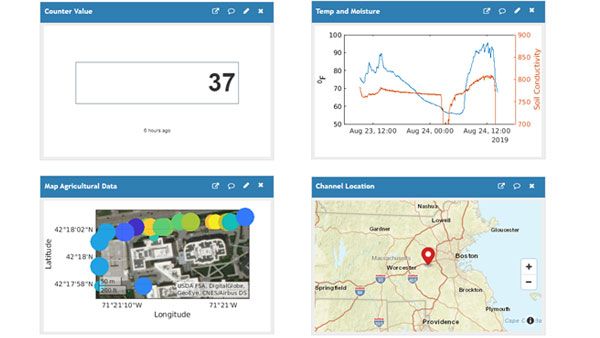
Every thing about a ThingSpeak Channel is customizable. You can control which fields get displayed, add a map, add a YouTube video, add status messages, or add ThingSpeak Plugins. The elements on a ThingSpeak Channel can be moved around using a drag-and-drop user interface.

Plugins

When we first launched ThingSpeak Plugins we made the plugins only privately accessible. Now, you can make a ThingSpeak Plugin public and add it to your channel views. Plugins are great for making new features for ThingSpeak, such as multiple trend-lines on a chart.

Public Channel List

We often get requests to share a list of the public channels offered on ThingSpeak. We have developed a system to display active ThingSpeak channels and score each channel. A channel gets a higher score by being actively updated, adding tags, adding a description, and adding a demo video. Check out the public channels on ThingSpeak.

ThingSpeak React

React is our biggest undertaking yet and we spent a year developing a robust and scalable system for monitoring channel data in real-time. With the React app you can set triggers on your channels to cause other events to fire. For example, if your temperature gets too high, you can send a ThingHTTP request to a control system to cause an alert. Since ThingSpeak has location data baked in, you can also create geolocation reacts. If you get within 100 meters of a lat/long, you can trigger an action. This is perfect for building location-based thermostats.

Next…

We are working on many features that we will release over the summer. We are also going to update the Open Source version of ThingSpeak on GitHub too. Please stay tuned for some exciting news.


21
May 13

Indoor Environmental Quality Station #arduino #thingspeak #instructables

[donmatito] created an Indoor Environmental Quality Station based on the Arduino platform and uses Bluetooth for connectivity to ThingSpeak cloud services. The great news is that Don completely documented the project at Instructables for others to learn from and add to. By using ThingSpeak he has made it easy to get access to the data with an app and share the data with other users.

ThingSpeak Air Quality Monitor

Indoor Environmental Quality (IEQ) is the measure of comfort and includes factors such as temperature, humidity, pressure, noise level, and indoor air quality. don’s original goal was to monitor the IEQ of his baby’s room, but he soon realized that his project has more applications around the house and for others.

Don published the full details of the project and submitted it to the Green Design Contest at Instructables. Great work!

[via Instructables]


19
Apr 13

2013 Cloud Robotics Hackathon Winners #iot #robots #cloud

Cloud Robotics Hackathon released the winners of this year’s event. Each year teams around the world create cloud-connected robots and systems. Some really interesting projects were released using the MyRobots.com Cloud Platform for robots. MyRobots connects all kinds of robots to services such as data logging, monitoring, and alerting built with ThingSpeak technology.

Here are the winners:

  • Honourable Mention: Team Telemetron
  • Third Place: Team RoboticApp – $500
  • Second Place: Team Human Hamster-Wheel – $1,000
  • First Place: Team RoboSamurai – $1,500

“Team RoboSamurai, truly exploited the full potential of MyRobots.com by a clever usage of the platform. Their application solves a real-life problem, is well implemented, is presented in an engaging ways and, most importantly, it features robot-to-robot collaboration robot-to-human collaboration, and monitoring. By using the specific capabilities of several robots the team is able to track a human working out and encourage him along the way. For this unique application, they win the first prize of $1,500!”

[via Cloud Robotics Hackathon]


28
Mar 13

Unlocking Data from Twine by using ThingSpeak

[Risto] from Supermechanical wrote a tutorial on how to use the Twine with ThingSpeak web services such as Data Logging and Charting. The tutorial explains how you can use the Twine’s easy-to-use sensor module to trigger events and push data over to ThingSpeak. This opens up the data captured by Twine and allows for all kinds of new applications.

The Supermechanical team put this combination of Twine and ThingSpeak to use right away. They created a “Productivity Quantification” system to capture events around the office and try to determine how productive they are. They were able to track how much coffee they were drinking, snacks they were eating, toilets they were flushing, and things they were finishing. The results are a quantified picture of office productivity and a beautiful display of the data via the ThingSpeak API.

Twine Coffee Maker Monitor

Creating a Twine Action to push data to ThingSpeak is really easy to do. Here’s what it looks like…

Twine Action to ThingSpeak

To do more with ThingSpeak and Twine make sure to check out the tutorial on the Supermechnical blog.

[via Twine / SUPERMECHANICAL.BLOG]


17
Mar 13

Réaliser une courbe, un graphique avec ThingSpeak tutorial [French]

[fredblabla] created a video tutorial on how to make a chart with ThingSpeak. This tutorial is in French and clearly explains how to setup a channel, post data to a channel, customize the charts, and add plugins to your ThingSpeak Channel page.

Merci beaucoup.

[via YouTube]


19
Feb 13

Open Source ThingSpeak Updates

Thanks to the very active ThingSpeak community, we have been able to make some updates to the open source ThingSpeak API and web app. We also have a major new release coming. The latest updates allow ThingSpeak to be installed without dependency on the Internet. This means you can run this on an embedded web server with no Internet connection. This is perfect for when you want to log sensor data behind a firewall and build apps that do not require (or have) remote connectivity.

GitHub ThingSpeak API

We want to send a special thanks to powermikoiotoshi, sekjal, and akinsgre for contributing new code and reporting bugs.

All of the latest code is available on GitHub, so start building your own Internet of Things today!


07
Dec 12

Send Tweets using Arduino Ethernet [Updated Tutorial]

We have updated our ThingTweet Tutorial to cover the Arduino Ethernet and the new Arduino IDE (v1 and above). ThingTweet is a ThingSpeak App that allows you to send Twitter status updates via your Arduino microcontroller with an Ethernet shield or with Ethernet integrated onto one board. Our Arduino examples for ThingSpeak and ThingSpeak Apps have been moved to GitHub, so that you can easily download, modify, and contribute updates.


21
Nov 12

Real-time Gas Sensor System with Microsoft Gadgeteer and ThingSpeak

TinyCLR master user [Duke Nukem] created a project using the Microsoft Gadgeteer and ThingSpeak Internet of Things web services. The Gadgeteer allows modular hardware development with plug-and-play sensors and controls. Mr. Nukem built a real-time gas sensor monitoring system that uploads its data to a ThingSpeak Channel. Once the data is on ThingSpeak, other developers can tap into the data and use it for control systems or for creating apps that process, analyze, and visualize the data. Duke also posts data and warnings to social networks such as Twitter via ThingSpeak’s ThingTweet web service.

Duke says,

“A demo of how to use ThingSpeak (an IOT web site) with a Gadgeteer Gas Sensor Device. Data from the sensors are displayed in real time on ThingSpeak and using some of ThingSpeak’s cool features the Gas Sensor device can send out Tweets for Alert and Alarm conditions.”

Another awesome part of this project is that it uses .NET Micro Framework library, μPLibrary 1.8, created by [paolopat]. This library makes it really easy to tap into ThingSpeak web services by embedded devices. It’s great to see different parts of the project coming together from multiple ThingSpeak users. We appreciate the creative combinations and the efforts that you are putting into your projects. Thanks!

For more information, check out the live sensor readings on the project’s ThingSpeak Channel and download the complete source code at Codeshare.

[via TinyCLR Forums]


16
Nov 12

EVE Alpha – Raspberry Pi Wireless Development

Kickstarter over the past few months has been the platform of choice for new Internet of Things hardware being developed. Many projects are an Arduino and another thing attached to it. While some of those projects are cool, they are not pushing the Internet of Things forward. Recently, Kickstarter changed their policies about hardware projects and also opened up the platform to the United Kingdom. This is forcing the projecteers to come up with more developed and innovative ideas that help differentiate themselves from rehashed projects and ideas.

One that has piqued our interest is the EVE Alpha for the Raspberry Pi created by Ciseco from Nottingham, United Kingdom. Wireless is a key part of the Internet of Things as with wireless we can connect more things in a more seamless way, then bridge them to the Internet. EVE Alpha aims at giving you a lot of wireless options in a tiny form factor all connected to an integrated computer called the Raspberry Pi.

EVE Alpha - Raspberry Pi Wireless Development

Members of the ThingSpeak team are backers of this project and many others. We love finding new ways to get data to and from web services. This is exactly what we are here to do! We are looking forward to connecting the EVE to a host of web services (and ones we haven’t even released yet). Another key feature is the suite of wireless technologies that we want to prototype with all on one board. At the timing of this writing the EVE Alpha Kickstarter campaign is close to being funded, so there are high chances that Ciseco will deliver the Swiss Army knife of wireless development platforms!

[via Kickstarter]


30
Oct 12

μPLibrary – .NET Micro Framework Client for ThingSpeak Platform

uP Library Logo

.NET Micro Framework Developer [paolopat] created a client for the ThingSpeak platform. This allows any device that supports the .NET Micro Framework to access ThingSpeak web services by using the μPLibrary 1.8. The library is available on NuGet Gallery and abstracts the ThingSpeak API. The library works with the popular Netduino Plus and other devices running .NET Micro Framework.

Paolo says,

“With more and more embedded devices “smart” in the world, begins to take on an increasingly important concept of the Internet of Things (IoT), a neologism by which you want to express the capacity that these devices (brutally “things”) in order to connect to the world wide web and exchange information. In this come into play a number of online platforms that provide the service to upload and logging information in real-time making it available to other devices that request them. The architecture is oriented such that the platform is obviously RESTful where the data grouped into channels and feeds are accessible through the concept of URL.

One of the main platforms is certainly ThingSpeak, for which I have implemented a client for. NET Micro Framework and I have included in my library uPLibrary (now at version 1.8.0.0) present on CodePlex, namespace uPLibrary.IoT.ThingSpeak.”

Thank you, Paolo!

[via Embedded101]